Your monthly marketing report arrives.
Google Analytics shows a healthy number of conversions. Your advertising campaigns seem to be generating enquiries, and your agency reports another positive month.
Then you open your CRM.
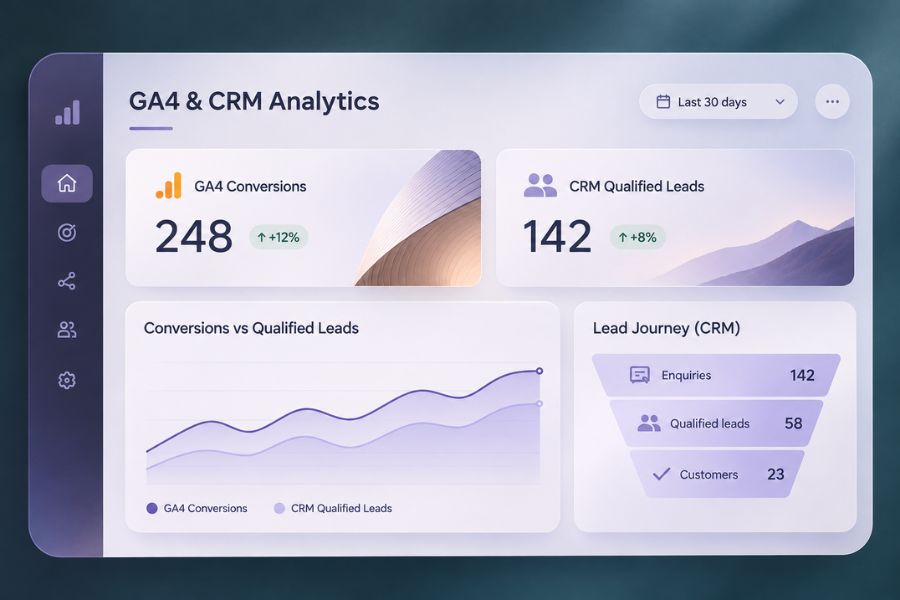
The numbers don’t match.
Your sales team has fewer leads than your analytics platform suggests, and some of the enquiries being counted never became meaningful conversations.
This is one of the most frustrating problems with GA4 conversion tracking.
For businesses investing in SEO, paid advertising, and lead generation, inaccurate or misunderstood measurement can influence expensive decisions.
Before increasing your marketing budget, you need to understand what your tracking is actually measuring.
GA4 and Your CRM Measure Different Things
Google Analytics 4 primarily helps businesses understand website and app interactions, traffic acquisition, and user behaviour.
Your CRM manages customer relationships, enquiries, and sales activities.
These systems serve different purposes.
GA4 might record when a visitor submits a form. Your CRM may record the same enquiry as a contact, then track whether it becomes qualified, receives a proposal, or turns into a customer.
A form submission is an interaction.
A qualified lead is a commercial assessment.
A customer is a business outcome.
These shouldn’t be treated as interchangeable.
Google Analytics also distinguishes between key events, which represent important website or app actions, and conversions used to evaluate advertising performance.
Understanding that distinction matters when comparing reports.
1. Your Tracking Might Be Counting the Wrong Actions
A common implementation problem occurs when conversion tracking is triggered before a form is successfully submitted.
For example, someone clicks the Submit button, but the form returns a validation error.
If the tracking event fires on the button click rather than successful submission, your analytics platform might record an action that never generated an enquiry.
Similar problems can occur with page views, contact button clicks, and thank-you pages.
A visitor reaching a thank-you page doesn’t always prove that a valid enquiry was created, particularly if that page can be accessed directly or revisited.
How to Check Your Events
Test the complete enquiry process.
Submit a valid form and confirm that the corresponding event appears in GA4 and that the enquiry reaches its intended destination.
Then test an invalid submission.
The event representing a successful lead should not fire when the form fails.
Google recommends generate_lead for lead submissions and provides additional events for later stages of the lead journey.
These include qualify_lead, disqualify_lead, and close_convert_lead.
Using consistent event definitions can make your reporting easier to interpret.
2. Duplicate Events Can Inflate Your Reports
Another common issue is duplicate tracking.
Your website might send an event through Google Tag Manager while a WordPress plugin sends the same event separately.
In other situations, a form integration may trigger multiple tracking actions from a single submission.
The result can be inflated event counts.
This creates confusion when your dashboard reports more leads than your CRM contains.
Before trusting conversion totals, inspect how events are generated.
Check whether the same action is being recorded through multiple integrations.
You should also review the counting settings and reporting metric you’re using.
An event count, a user count, and an attributed conversion count aren’t necessarily the same thing.
Your tracking setup needs a clear definition of what constitutes one successful enquiry.
3. Attribution Makes the Numbers More Complicated
Imagine a potential customer discovers your business through Google Search.
A few days later, they return through a paid advertisement.
After reviewing a case study, they contact your team directly.
Which channel deserves credit?
Different platforms and reports may answer that question differently.
Attribution models, reporting windows, consent settings, and identity signals can influence how conversions are reported.
A conversion attributed to Google Ads doesn’t necessarily represent an additional unique lead beyond the enquiries already recorded in your CRM.
You should therefore avoid adding conversion totals from different advertising platforms and treating the result as a count of unique customers.
For businesses using Google Ads alongside organic search and other channels, attribution needs to be interpreted carefully.
The objective is to understand how marketing contributes to customer acquisition without pretending every interaction can be assigned perfectly.
4. Your CRM Might Be Missing Information Too
Not every discrepancy originates in Google Analytics.
Sometimes a website form records a successful submission, but the CRM integration fails.
The enquiry might arrive by email without creating a CRM contact.
Duplicate contact rules could also merge new enquiries into existing records.
Alternatively, a salesperson might receive a lead but never update its status.
These operational gaps can make CRM reports incomplete.
Your investigation should follow the entire process, from form submission to the final sales record.
Check whether enquiries are captured, transferred, assigned, and updated correctly.
If your systems frequently require manual data transfers, workflow automation may help establish a more reliable process.
However, automation should include error monitoring and clear ownership.
Connecting two systems doesn’t guarantee accurate data.
5. You’re Optimising for Leads Instead of Customers
A campaign can generate many form submissions without producing valuable opportunities.
This is particularly relevant for businesses selling high-ticket services.
Someone requesting general information isn’t necessarily as valuable as a prospect with a defined project, suitable budget, and genuine buying intent.
If your advertising strategy optimises only for form submissions, it may favour campaigns generating high volumes of low-quality enquiries.
Your measurement should extend beyond the initial conversion.
Track which leads become qualified, which progress to meetings, and which eventually become customers.
Where appropriate, Google Ads enhanced conversions for leads can help connect eligible offline sales outcomes with earlier advertising interactions.
This requires reliable customer data, appropriate privacy controls, and correct implementation.
But it can provide a more useful basis for evaluating campaign performance than form submissions alone.
What Isn’t Worth Doing
Don’t make major budget decisions based on conversion totals you haven’t validated.
Don’t install additional tracking plugins hoping they’ll automatically resolve inconsistent data.
And don’t assume your CRM or GA4 must be wrong simply because their numbers differ.
Some differences are expected because these systems measure different activities.
Others reveal technical problems requiring investigation.
The important thing is understanding which differences are legitimate and which indicate missing or duplicated information.
You should also avoid building increasingly complicated dashboards before establishing reliable event definitions.
More charts won’t fix unreliable data.
How to Build Reporting You Can Actually Trust
Start with a measurement plan.
Define what counts as an enquiry, a qualified lead, a sales opportunity, and a customer.
Then document which system records each stage.
For example, GA4 can track successful website interactions, while your CRM maintains the operational record of leads and sales outcomes.
Connect the systems where useful, but retain clear distinctions between their roles.
Test important events regularly and investigate discrepancies.
Your SEO & GEO reporting and paid advertising analysis should ultimately support real business decisions, not simply present attractive performance figures.
At Onum, we believe accurate measurement is part of responsible marketing.
When the data is incomplete, the right approach is to explain the limitation and improve the process.
Because a dashboard showing impressive conversions means very little if nobody can explain what happened to those leads.
FAQ
Why does GA4 show more conversions than my CRM?
Possible causes include duplicate tracking, incorrectly triggered events, different counting methods, attribution settings, missing CRM integrations, and differences between website interactions and unique lead records.
What is the difference between a GA4 key event and a conversion?
A key event represents an important website or app interaction. Conversions are used to measure and optimise advertising performance. Their reporting and attribution settings can differ.
Can GA4 track qualified leads?
Yes. GA4 supports recommended lead-related events, including qualify_lead, when the necessary information is collected and sent through an appropriate implementation.
Should I use GA4 or my CRM to measure marketing success?
Use both for their intended purposes. GA4 helps explain digital interactions and acquisition, while the CRM provides information about lead qualification and sales outcomes. Combining the two gives a more complete picture.
Let’s Make Your Marketing Numbers Mean Something
If your analytics dashboards and sales reports tell different stories, we’d be happy to investigate what’s happening. Let’s talk about your tracking setup, reporting process, and how to connect marketing performance with the opportunities your business actually generates.